Policies and Procedures worksheets
The policy worksheet, the procedure worksheet, the workflow map, the procedure checklist, and the implementation and monitoring page.
Word and PDF · 10 pages · 37 KB Word, 366 KB PDF
The Policies and Procedures worksheets for Chapter 8, Systematizing the Predictable. A policy worksheet holds the why, a procedure worksheet holds the how, and the workflow map and checklist that follow them are the two pieces most commonly missing. The procedure worksheet is the SOP template.
Word and PDF · 10 pages · Free to download. Part of The Law Firm Operating System Implementation Workbook.
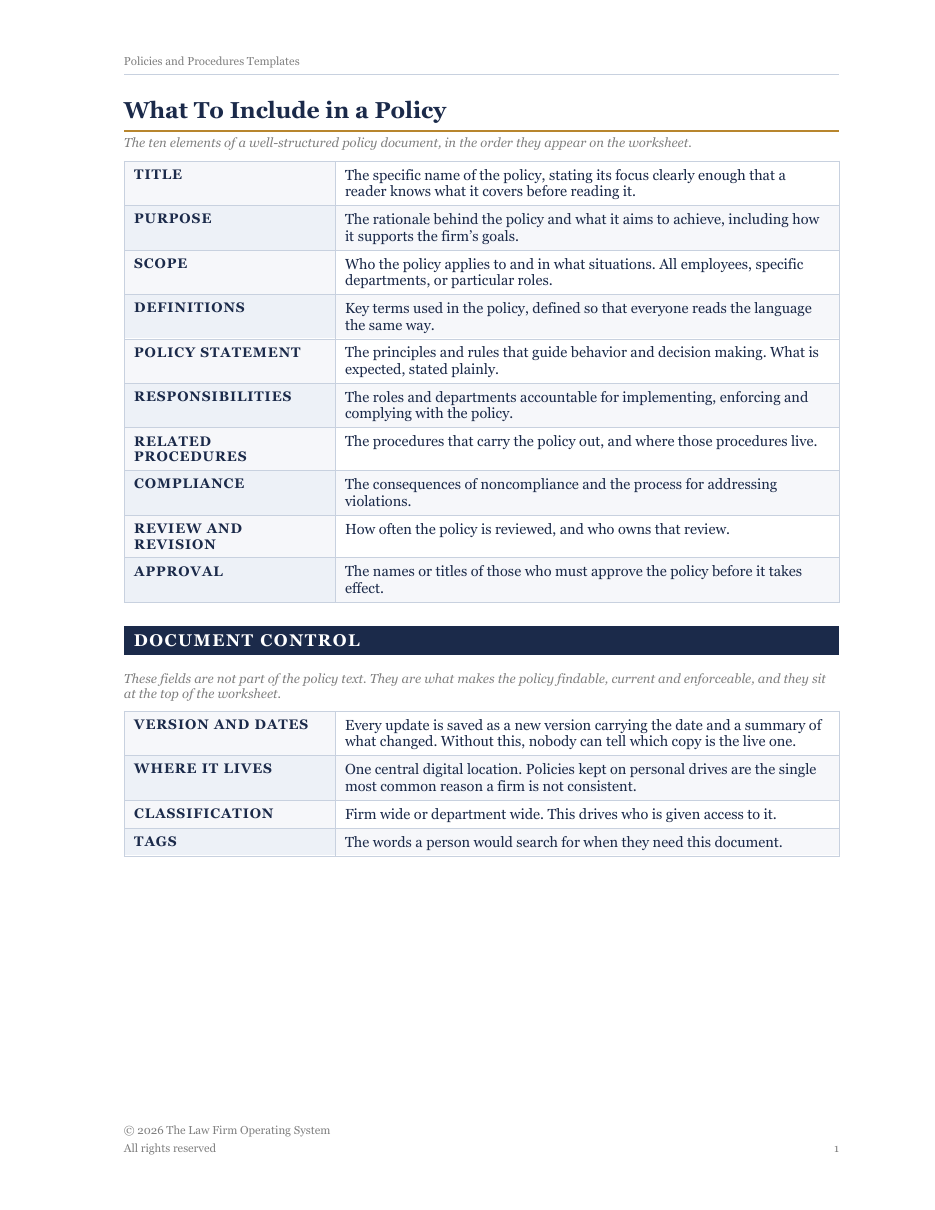
Sixteen pages: what to include in a policy, the policy worksheet, what to include in a procedure, the procedure worksheet, a workflow map, a procedure checklist, and a page for implementation and monitoring.
The specific name of the procedure, identifying the process being outlined.
The policy this procedure carries out. A procedure with no policy behind it is an orphan instruction.
The team responsible for executing and maintaining the procedure.
Why the procedure exists and what it is intended to achieve.
The roles tasked with performing and overseeing the procedure.
Terms, acronyms and firm specific references used in the steps.
The systems, software and resources needed to carry the procedure out, and who grants access to them.
The step-by-step actions, numbered, each with the role responsible and the system used. One action per step: if a step needs the word and, it is two steps.
What to do when a step fails, and who to escalate to.
How often the procedure is reviewed, and who owns that review.
Document control sits at the top of both worksheets and is what makes a document findable, current and enforceable: version and dates, so nobody has to guess which copy is live; where it lives, one central digital location; classification, firm wide or department wide; and tags, the words a person would search for.
The why. Two pages: title and document control, purpose, scope, definitions, the policy statement, responsibilities, related procedures, and compliance.
The how. Up to eighteen numbered steps, each with a responsible role and the system used. Then the two pieces most commonly missing: the workflow map, which shows where the work goes next, and the checklist the team works from once they know the procedure.
Does it create an efficiency that would not exist if it had never been written? Would a new hire follow it without asking a question? Does it name the one central location where the live copy lives? Does it carry a version number and a summary of what changed? Has everyone affected been trained and signed off? A no on any one means it is not ready.
Communicate the change with a date, get approval, train on it, open a period for questions, and obtain written sign off. Then check at one day, one week, one quarter and one year after. A policy nobody follows is not a policy.
One document holds the policy worksheet, the procedure worksheet, the workflow map and the checklist.
The policy worksheet, the procedure worksheet, the workflow map, the procedure checklist, and the implementation and monitoring page.
Word and PDF · 10 pages · 37 KB Word, 366 KB PDF